
Refresh a JWT Workflow
In this tutorial, you will learn how to create a workflow to refresh a JSON Web Token (JWT) when it expires.
Typically, to continue authenticated testing in Replay, session tokens would need to be manually updated in the request headers.
However, by combining multiple features available in Caido, this process can be automated.
We will use the https://dummyjson.com API to demonstrate the workflow.
According to the https://dummyjson.com/docs/auth documentation, any user credentials returned from the /users endpoint can be used to authenticate with the /auth/login endpoint. By including the expiresInMins parameter, we can simulate a short-lived JWT.
POST /auth/login HTTP/1.1
Host: dummyjson.com
Content-Type: application/json
Content-Length: 63

{"username":"emilys","password":"emilyspass","expiresInMins":1}
In the response to this request, an accessToken and refreshToken are returned.
Until the accessToken expires, it can be used to access sensitive user data from the /auth/me endpoint:
GET /auth/me HTTP/1.1
Host: dummyjson.com
Connection: close
Authorization: Bearer eyJhbGciOiJIUzI1NiIsInR5cCI6IkpXVCJ9.eyJpZCI6MSwidXNlcm5hbWUiOiJlbWlseXMiLCJlbWFpbCI6ImVtaWx5LmpvaG5zb25AeC5kdW1teWpzb24uY29tIiwiZmlyc3ROYW1lIjoiRW1pbHkiLCJsYXN0TmFtZSI6IkpvaG5zb24iLCJnZW5kZXIiOiJmZW1hbGUiLCJpbWFnZSI6Imh0dHBzOi8vZHVtbXlqc29uLmNvbS9pY29uL2VtaWx5cy8xMjgiLCJpYXQiOjE3Nzk2NDM0MDEsImV4cCI6MTc3OTY0MzQ2MX0.t-mV4fcqjvQmRu-I2is_iWV7_1MoJ2h8eVmCQMNhlnk
Once a minute has passed, a 401 Unauthorized response is returned instead of user data with a body notifying the accessToken has expired:
{
    "message": "Token Expired!"
}
With the refreshToken that was returned in the initial login response, a new valid accessToken can be obtained from the response to a POST request to the /auth/refresh endpoint:
POST /auth/refresh HTTP/1.1
Host: dummyjson.com
Content-Type: application/json
Content-Length: 397

{"refreshToken":"eyJhbGciOiJIUzI1NiIsInR5cCI6IkpXVCJ9.eyJpZCI6MSwidXNlcm5hbWUiOiJlbWlseXMiLCJlbWFpbCI6ImVtaWx5LmpvaG5zb25AeC5kdW1teWpzb24uY29tIiwiZmlyc3ROYW1lIjoiRW1pbHkiLCJsYXN0TmFtZSI6IkpvaG5zb24iLCJnZW5kZXIiOiJmZW1hbGUiLCJpbWFnZSI6Imh0dHBzOi8vZHVtbXlqc29uLmNvbS9pY29uL2VtaWx5cy8xMjgiLCJpYXQiOjE3Nzk2NDA4OTIsImV4cCI6MTc4MjIzMjg5Mn0.kmaBxCM5Sq1ybQFZcspzf1HnJBPpZ9maMwOUjxreoYI","expiresInMins":1}
Creating a Convert Workflow
To begin, navigate to the Workflows interface, select the Convert tab, and click on the + New workflow button.

Next, rename the workflow by typing in the Name input field. You can also provide an optional description of the workflow's functionality by typing in the Description input field.
Nodes and Connections
For this workflow, the overall node layout will be:
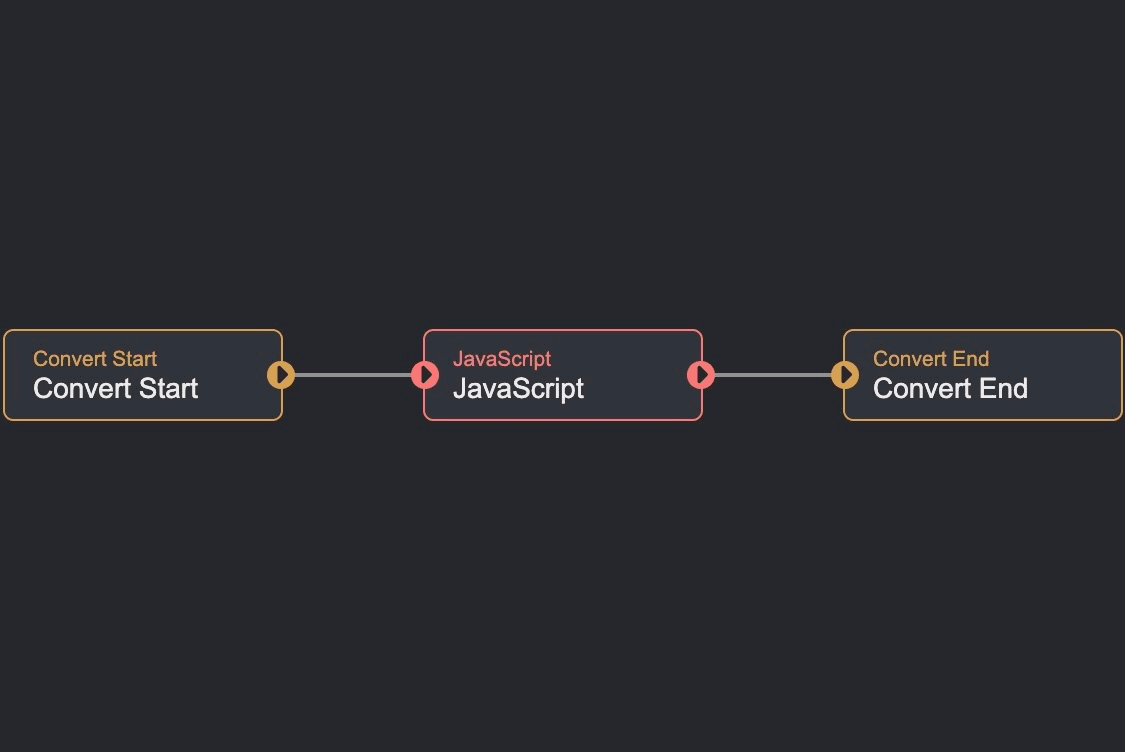
- The
Convert Startnode outputs$convert_start.datathat represents the user-selected data that will undergo conversion (in this case, theaccessTokenJWT that is the value of theAuthorizationheader in a request). - The
Javascriptnode executes a script on theaccessTokenand outputs the converted data as$javascript.data. - Once the script in the
Javascriptnode finishes, the workflow will end.
Refreshing the JWT
Click on the
Javascriptnode to access its editor.Then, click within the coding environment, select all of the existing code, and replace it with the following script:
import { Request as FetchRequest, fetch } from "caido:http";

async function saveTokens(sdk, body) {
  await sdk.env.setVar({
    name: "ACCESS_TOKEN",
    value: body.accessToken,
    secret: false,
    global: true,
  });
  await sdk.env.setVar({
    name: "REFRESH_TOKEN",
    value: body.refreshToken,
    secret: false,
    global: true,
  });
}

async function login(sdk) {
  const resp = await fetch(
    new FetchRequest("https://dummyjson.com/auth/login", {
      method: "POST",
      headers: {
        "Content-Type": "application/json",
      },
      body: JSON.stringify({
        username: "emilys",
        password: "emilyspass",
        expiresInMins: 1,
      }),
    }),
  );
  if (!resp.ok) {
    sdk.console.error(`Login failed: ${resp.status} ${resp.statusText}`);
    sdk.console.error(await resp.text());
    return null;
  }
  const body = await resp.json();
  sdk.console.log(`/auth/login: ${resp.status} ${resp.statusText}`);
  sdk.console.log(JSON.stringify(body));
  await saveTokens(sdk, body);
  return body.accessToken;
}

async function refresh(sdk, refreshToken) {
  const resp = await fetch(
    new FetchRequest("https://dummyjson.com/auth/refresh", {
      method: "POST",
      headers: {
        "Content-Type": "application/json",
      },
      body: JSON.stringify({
        refreshToken,
        expiresInMins: 1,
      }),
    }),
  );
  if (!resp.ok) {
    sdk.console.error(`Refresh failed: ${resp.status} ${resp.statusText}`);
    sdk.console.error(await resp.text());
    return null;
  }
  const body = await resp.json();
  sdk.console.log(`/auth/refresh: ${resp.status} ${resp.statusText}`);
  sdk.console.log(JSON.stringify(body));
  await saveTokens(sdk, body);
  return body.accessToken;
}

export async function run({ data, extra }, sdk) {
  let accessToken = sdk.env.getVar("ACCESS_TOKEN");

  if (!accessToken) {
    const token = await login(sdk);
    return { data: token ?? sdk.asString(data), extra };
  }

  const meResp = await fetch(
    new FetchRequest("https://dummyjson.com/auth/me", {
      method: "GET",
      headers: {
        Authorization: `Bearer ${accessToken}`,
      },
    }),
  );
  sdk.console.log(`/auth/me: ${meResp.status} ${meResp.statusText}`);

  if (meResp.status !== 401) {
    if (!meResp.ok) {
      sdk.console.error(await meResp.text());
    }
    return { data: accessToken, extra };
  }

  const refreshToken = sdk.env.getVar("REFRESH_TOKEN");
  if (refreshToken) {
    const token = await refresh(sdk, refreshToken);
    if (token) {
      return { data: token, extra };
    }
  }

  sdk.console.log("Refresh unavailable or failed; logging in again");
  const token = await login(sdk);
  return { data: token ?? accessToken, extra };
}- Next, ensure the
$convert_start.datais referenced as input data.

Once these steps are completed, close the editor window and click on the Save button to update and save the configuration.
Script Breakdown
To be able to send a fetch request, the Request class and the fetch() function are imported from the caido:http module.
import { Request as FetchRequest, fetch } from "caido:http";The saveTokens() function is defined to set environment variables ACCESS_TOKEN and REFRESH_TOKEN in the global environment.
async function saveTokens(sdk, body) {
  await sdk.env.setVar({
    name: "ACCESS_TOKEN",
    value: body.accessToken,
    secret: false,
    global: true,
  });
  await sdk.env.setVar({
    name: "REFRESH_TOKEN",
    value: body.refreshToken,
    secret: false,
    global: true,
  });
}
The login() function is defined to log in with valid user credentials. If authentication is successful, the accessToken and refreshToken are saved to the global environment using the saveTokens() function.
async function login(sdk) {
  const resp = await fetch(
    new FetchRequest("https://dummyjson.com/auth/login", {
      method: "POST",
      headers: {
        "Content-Type": "application/json",
      },
      body: JSON.stringify({
        username: "emilys",
        password: "emilyspass",
        expiresInMins: 1,
      }),
    }),
  );
  if (!resp.ok) {
    sdk.console.error(`Login failed: ${resp.status} ${resp.statusText}`);
    sdk.console.error(await resp.text());
    return null;
  }
  const body = await resp.json();
  sdk.console.log(`/auth/login: ${resp.status} ${resp.statusText}`);
  sdk.console.log(JSON.stringify(body));
  await saveTokens(sdk, body);
  return body.accessToken;
}
The refresh() function is defined to refresh the accessToken using the refreshToken that was saved to the global environment. If the refresh is successful, the accessToken is saved to the global environment using the saveTokens() function.
async function refresh(sdk, refreshToken) {
  const resp = await fetch(
    new FetchRequest("https://dummyjson.com/auth/refresh", {
      method: "POST",
      headers: {
        "Content-Type": "application/json",
      },
      body: JSON.stringify({
        refreshToken,
        expiresInMins: 1,
      }),
    }),
  );
  if (!resp.ok) {
    sdk.console.error(`Refresh failed: ${resp.status} ${resp.statusText}`);
    sdk.console.error(await resp.text());
    return null;
  }
  const body = await resp.json();
  sdk.console.log(`/auth/refresh: ${resp.status} ${resp.statusText}`);
  sdk.console.log(JSON.stringify(body));
  await saveTokens(sdk, body);
  return body.accessToken;
}
The run() function is defined to execute the workflow. If the accessToken is not set, the login() function is called to log in with valid user credentials. If the accessToken is set, the refresh() function is called to refresh the accessToken using the refreshToken that was saved to the global environment. If the refresh is successful, the accessToken is saved to the global environment using the saveTokens() function.
export async function run({ data, extra }, sdk) {
  let accessToken = sdk.env.getVar("ACCESS_TOKEN");

  if (!accessToken) {
    const token = await login(sdk);
    return { data: token ?? sdk.asString(data), extra };
  }

  const meResp = await fetch(
    new FetchRequest("https://dummyjson.com/auth/me", {
      method: "GET",
      headers: {
        Authorization: `Bearer ${accessToken}`,
      },
    }),
  );
  sdk.console.log(`/auth/me: ${meResp.status} ${meResp.statusText}`);

  if (meResp.status !== 401) {
    if (!meResp.ok) {
      sdk.console.error(await meResp.text());
    }
    return { data: accessToken, extra };
  }

  const refreshToken = sdk.env.getVar("REFRESH_TOKEN");
  if (refreshToken) {
    const token = await refresh(sdk, refreshToken);
    if (token) {
      return { data: token, extra };
    }
  }

  sdk.console.log("Refresh unavailable or failed; logging in again");
  const token = await login(sdk);
  return { data: token ?? accessToken, extra };
}
Testing the Workflow
To test the workflow:
- Send the following request via Replay:
POST /auth/login HTTP/1.1
Host: dummyjson.com
Content-Type: application/json
Content-Length: 63

{"username":"emilys","password":"emilyspass","expiresInMins":1}
Copy the value of the
accessTokenfrom the response.Send the following request via Replay using the
accessTokenyou copied in the previous step as the value of theAuthorizationheader:
GET /auth/me HTTP/1.1
Host: dummyjson.com
Connection: close
Authorization: Bearer <accessToken>
After one minute has passed send the previous request again and notice that a 401 Unauthorized response is returned.
Click, hold, and drag over the
accessTokenvalue of theAuthorizationheader and click the+button to add it as a placeholder.Then, click on the associated edit button
of the placeholder to open thePlaceholder Settingswindow.
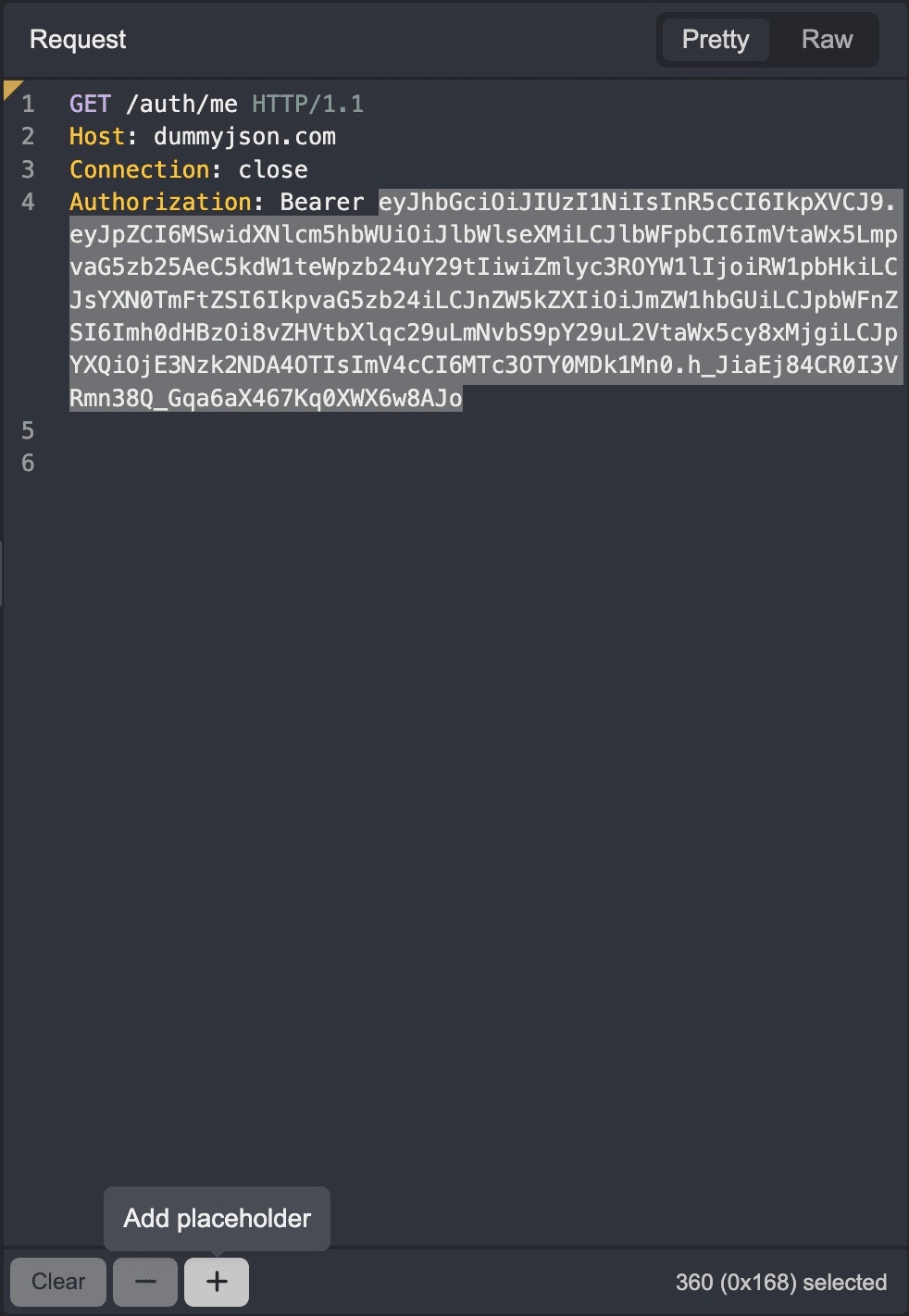
Click on the
Typedrop-down menu and selectWorkflow.Click on the
Workflowdrop-down menu and select the workflow from the list.Click on the
Addbutton to save the configuration.
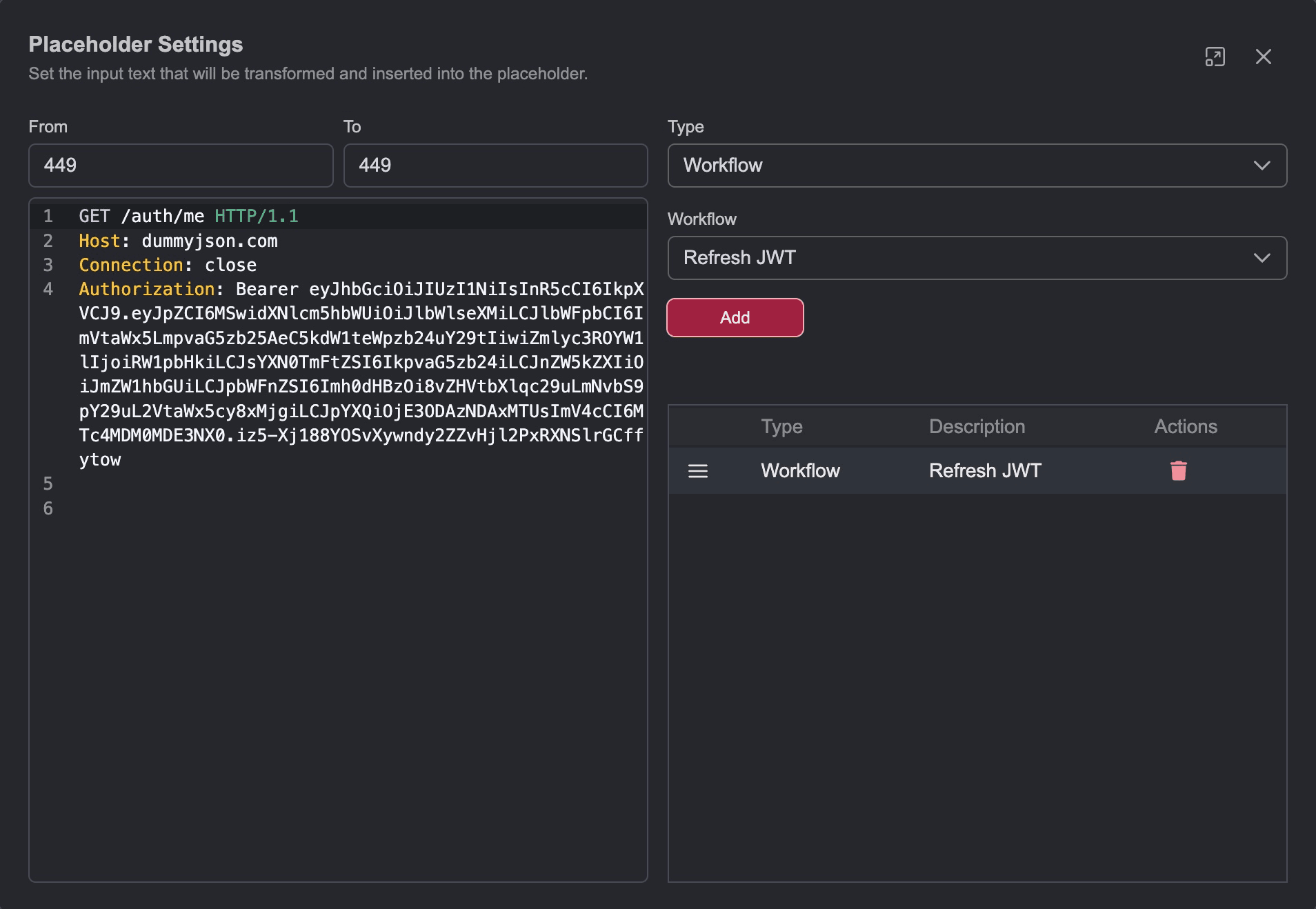
- Close the settings window and send the request.
